

 README

README

Golunar - Lunar Lander Game
A terminal-based Lunar Lander game written in Go using the tcell library. Land your spacecraft safely on the moon's surface while avoiding meteors and managing fuel efficiently!
Check your landing speed against actual speed.
Features
- Classic Lunar Lander Gameplay: Navigate your lander to a safe landing while managing fuel consumption
- Multiple Difficulty Levels: Choose from Easy, Medium, and Hard modes
- Meteor Avoidance: Dodge incoming meteors to survive
- Cross-Platform Support: Runs on native platforms and in WebAssembly
- Terminal UI: Beautiful text-based graphics using tcell
- Interactive Menu System: Easy navigation between game modes and instructions
Demo video on YouTube
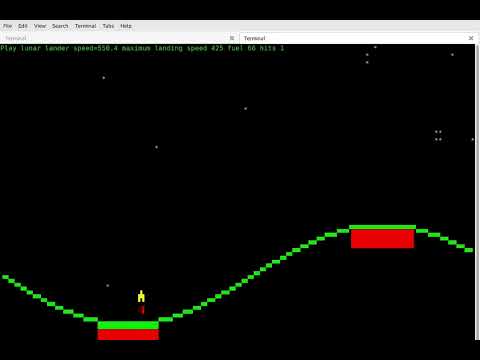
Gameplay
Controls
The controls are a compromise as you cannot detect key press and release events through the terminal. Hack is for thrust to be the up arrow key or shift and the left/right arrow key.
- Left/Right Arrow Keys: Rotate your lander
- Up Arrow Key: Fire main thruster
- Shift + Left/Right Arrow: Fire side thrusters
- Enter/Escape: Return to main menu
Objective
- Land your spacecraft safely on the moon's surface
- Avoid collisions with meteors
- Conserve fuel to maximize your score
- Survive all difficulty levels
Install
If you already have go instaled you can just run
go install github.com/bernardjason/golunar@latest
go lunar
to install and run
Building
Prerequisites
- Go 1.24.3 or higher
- Required dependencies: tcell/v3 and golang.org/x/image
Native Build
go build -o golunar
./golunar
WebAssembly Build
GOOS=js GOARCH=wasm go build -o wasm/main.wasm
cd wasm
python3 -m http.server
then visit http://127.0.0.1:8000
Then serve the wasm/ directory using a web server to play in your browser.
Project Structure
main.go- Main game loop and initializationlandscape.go- Landscape rendering and collision detectionmeteor.go- Meteor generation and movement logicmenu.go- Interactive menu systemdraw.go- Drawing and rendering utilitieslogo.go- Game logo displayplatform_native.go- Native platform-specific codeplatform_wasm.go- WebAssembly platform-specific codeinstructions.go- In-game instructions displaywasm/- WebAssembly web interfaceindex.html- Main HTML filewasm_exec.js- JavaScript bridge for Go WASMtcell.js- tcell terminal emulator for browsertermstyle.css- Terminal styling
Dependencies
- tcell/v3 - Terminal/console toolkit
- golang.org/x/image - Image manipulation
Running the Game
After building, simply run the executable:
./golunar
The game will display a menu with the following options:
- Start Game Easy
- Start Game Medium
- Start Game Hard
- Instructions
- Exit
License
See LICENSE file for details.
Development
The project uses Go modules for dependency management. To install dependencies:
go mod download
 Documentation

 Source Files